
VIP member

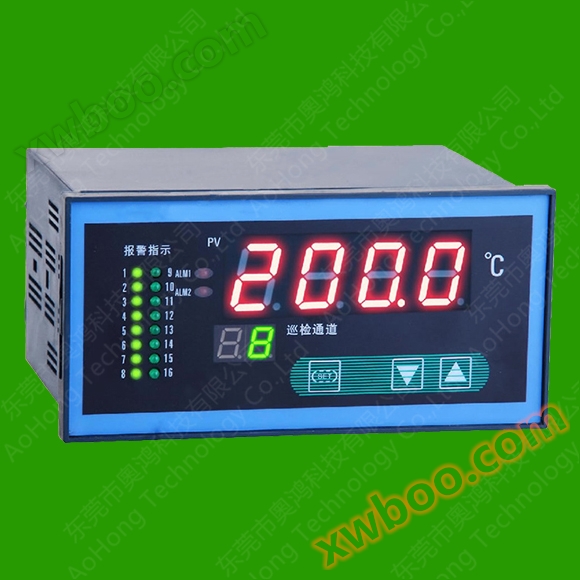
PT100/PT1000/thermocouple sixteen channel temperature inspection instrument (with RS485 capability)
YY-F1660 multi-channel inspection instrument is a sixteen channel intelligent temperature control instrument that uses computer technology. The instru
Product details
PT100/PT1000/thermocouple sixteen channel temperature inspection instrument (with RS485 capability)
1、 Technical performance
1. Input types: CU50 (-50.0-150.0 ℃), Pt100 (-199-600.0 ℃), Pt1000 (-199-600.0 ℃)
K (0-1300 ℃), E (0-700.0 ℃), J (0-900.0 ℃), S (0-1600 ℃)
Note 1: When the user places an order specifying input signals of 0-5V and 1-5V analog signals, the instrument no longer supports the input of various thermocouple and thermistor signals mentioned above,
Note 2: This instrument is a multi-channel instrument that can connect multiple sensors. But isolated sensors must be selected. Taking a thermocouple as an example: both wires of the thermocouple
Cannot conduct with metal casing. Otherwise, there may be situations such as inaccurate temperature measurement.
2. Alarm relay contact capacity: 220V 3A (resistive)
3. Measurement accuracy: ± 0.5F • S ± 1 word, additional cold end calibration error ± 1 ℃
4. Working power supply: AC220V 50Hz Power consumption: less than 5W
5. Working environment: 0~50 ℃, relative humidity ≤ 85% RH, non corrosive and non strong electromagnetic radiation environment
6. Dimensions: 160 × 80 × 130 Hole size: 152 × 76 (mm)
2、 Instrument panel


Note: 1: Printer interface wiring: This instrument uses TTL level interface for printing. The 'R' is connected to the busy line of the printer, the 'T' is connected to the data line of the printer, and the GND is connected to the ground line of the printer. Other lines do not need to be connected.
2: The communication and printing functions of the instrument cannot be combined at the same time, choose one of the two.
4、 Instrument usage
1. Normal display status of the instrument
① In normal use, the upper display window shows the temperature value measured in the current channel, the lower display window shows the current channel number, and the current channel also has indicator lights displayed. When setting parameters, the lower row displays the parameter symbol and the upper row displays the set value.
② Press the SET key for 3 seconds to enter the parameter menu. Press the ▼ key or ▲ key to set any value within the specified range for the parameters. Long press the ▼ key or ▲ key to achieve fast continuous reduction or addition; Press the SET and ▼ keys to exit the menu midway.
③ In automatic inspection mode, press the ▼ or ▲ key for 3 seconds to enter the channel fixed-point or loop display setting state. Press the ▼ or ▲ key to set the value of the lower window to a certain number of channels from 1 to LU. When the value is set to 0 or press the SET key, the instrument will return to the loop display state,
④ When there is an alarm output, the alarm indicator light is on. If there is an upper limit alarm, the corresponding channel indicator light will flash; If the lower limit alarm is triggered, the corresponding channel indicator light will remain on.
= 5 /* GB3 /* MERGEFORMAT⑤Printing function time parameter setting (only available with printing function): Press and hold the SET key, ▼ key, and ▲ key for more than 3 seconds to enter the printing time setting state.
⑥ Manual instant printing (only available with printing function): Press the SET+▲ key for 3 seconds, and the instrument will print the data instantly once.
2. Setting of basic parameters of instruments
|
Serial Number |
grounds site |
symbol |
name |
Setting Range |
describe |
Factory value |
||||||
|
|
|
Lower row display value |
Channel fixed-point inspection value |
causeLudecision (0~16) |
When users need to perform fixed-point inspections on a certain channel, they can set the parameter value to the channel number. If the value is0When, it is in automatic inspection mode |
0 |
||||||
|
0 |
0000H |
LC |
combination lock |
0~255 |
LK=18When, all parameter values can be modified |
18 |
||||||
|
1 |
0001H |
Sn |
Sensor input type |
- |
CU50; PT100; K; E; J; |
- |
||||||
|
2 |
0002H |
A1 |
Upper limit alarm |
full scale |
When measuring temperature>A1When, an upper limit alarm is generated (indicator light flashes) |
- |
||||||
|
3 |
0003H |
A2 |
Lower limit alarm |
full scale |
When the measured temperature is less thanA2At this time, a lower limit alarm is generated (the indicator light is constantly on) |
- |
||||||
|
4 |
0004H |
dp |
Display Accuracy |
0~1 |
dp=0No decimal point; dp=1Display decimal point |
0 |
||||||
|
5 |
0005H
|
Lu |
Channel number setting |
1~LP |
Users can adjust the required number of channels within the factory value range |
- |
||||||
|
6 |
0006H
|
t1 |
Inspection interval time |
4~120second |
The user can set this parameter to customize the inspection interval time |
4 |
||||||
|
7 |
0007H
|
t2 |
mail address/print time |
1~9999 |
When using serial communication function‘t2’Indicate the communication address for each channel When equipped with printing function‘t2’Indicates the timed interval printing time(Score) |
- |
||||||
|
8 |
0008H |
bt |
Baud rate |
- |
1200 、2400、4800、9600(Print)Function is meaningless) |
9600 |
||||||
|
10 |
000AH
|
OP |
Output mode selection |
0~2 |
0: None 1: WithRS485communication 2: With printing function |
By customer require |
||||||
|
11 |
000BH
|
C1 |
auxiliary word for ordinal numbers1Road sensor error correction |
|
|
|
||||||
|
………. . |
|
……. |
|
|
|
|
||||||
|
26 |
001AH |
C16 |
auxiliary word for ordinal numbers16Road sensor error correction |
|
|
|
||||||
|
Simultaneously press and hold the SET key▼ key, ▲ key, three keys3For seconds or more, enter the printing time setting state. |
|
|||||||||||
|
125 |
yer |
year |
0~99 |
Set year parameters |
- |
|
||||||
|
126 |
yu |
month |
1~12 |
Set month parameters |
- |
|
||||||
|
127 |
dA |
date |
1~31 |
Set date parameters |
- |
|
||||||
|
128 |
Ho |
hour |
00~23 |
Set hour parameters |
- |
|
||||||
|
129 |
FE |
minute |
00~59 |
Set minute parameters |
- |
|
||||||
5matters needing attention:
1. The equipped sensors must be isolated type.
2. If all the numbers on the instrument display jumping, please check if the working voltage of the instrument is normal and make it comply with the regulations.
3. After being powered on, the upper display window keeps showing "HH". Please check if the sensor is disconnected, short circuited, or if there are any other wiring conditions.
4. If any channel experiences an upper limit alarm, the indicator light for that channel will flash, the ALM1 light will turn on, and the relay will close; If any channel experiences a lower limit alarm.
5. The channel indicator light is constantly on, the ALM2 light is on, and the relay is engaged.
6. The parameter cannot be changed, please check if 'LC' is 18.
Online inquiry
-
Contacts
-
Company
-
Telephone
-
Email
-
WeChat
-
Verification Code
-
Message Content
-