
VIP member
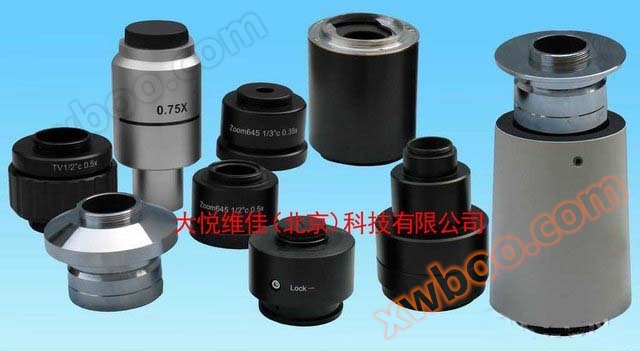
Microscope CCD interface, microscope digital camera interface, microscope DSLR camera interface
Our company has long provided Olympus, Nikon, Leica, Zeiss microscope CCD interfaces, microscope adapters, microscope C-type interfaces, microscope di
Product details
Our company has long provided Olympus, Nikon, Leica, Zeiss microscope CCD interfaces, microscope adapters, microscope C-type interfaces, microscope digital camera adapters, microscope DSLR camera adapters, microscope cameras, microscope photography, microscope photography, microscope adapters, microscope photography devices, microscope camera devices, couplings, photography adapters, adapters, eyepiece photography devices.
The microscope interface, microscope CCD interface, microscope DSLR camera interface, and microscope digital camera interface are suitable for connecting microscope digital cameras (CCD)/DSLR cameras/digital cameras/cameras with the third eye tube or eyepiece tube of the microscope, to achieve functions such as camera, photography, photography of microscope images, as well as image annotation and measurement.
Similar interfaces include microscope adapters, microphotography devices, microphotography devices, mount rings, photography mount tubes, adapter tubes, and eyepiece photography devices. We can process and customize special interfaces.
The difference between microscope C interface and CS interface:
At present, most of the third eye interfaces of microscopes, commonly known as C interfaces and CCD interfaces, adopt the C-mount interface standard. It provides a male thread to connect with the female ports of digital cameras and CCDs, in order to achieve synchronous display of images under the microscope and computer screens. Some manufacturers also use CS interface standards for their microscope C interface and CCD interface. The threaded parts of the two are the same, with a thread specification of 32 threads per inch, designed according to the "ANSI B1.1" standard. But the distance from the lens to the photosensitive surface is different between the two:
CS mount: The distance between the image sensor and the lens should be 12.5 mm
C-mount: The distance between the image sensor and the lens should be 17.5 mm.
A 5mm washer (C/CS connection ring) can be used to convert a C-mount lens to a CS mount lens. C-mount was the initial standard, while CS mount is an upgrade to it that can reduce manufacturing costs.
Matching of microscope C interface, CCD interface and digital camera:
In addition to the common 1X interface, there are also 0.35X, 0.4X, 0.5X, 0.63X, and 0.7X options available for microscope C interface and CCD interface. The selection of C interface and CCD interface should match the field of view of the microscope and the target size of the digital camera's sensor. If the magnification of the selected C interface/CCD interface is greater than the inches of the CCD sensor target, the captured image will clearly feel that the field of view is too small (that is, the amount of information collected is relatively small). If the selected C/CCD interface is smaller than the target surface of the camera's sensor, there will be dark corners in the image (i.e. uneven brightness around the image). Usually, the corresponding selection is as follows: the camera on the 1/3 "target surface selects the 0.35X interface, the camera on the 1/2" target surface selects the 0.5X interface, and the camera on the 2/3 "inch surface selects the 0.7X interface.
At present, many digital interfaces in China only consider imaging and cost, without taking into account factors such as color difference, field curvature, and whether distortion is synchronized with the image under the eyepiece. As a result, there are various problems with the naturally captured images, such as color difference at the edges not being corrected properly, blurred edges in the middle not being corrected for flat field, and uneven straight lines being caused by field curvature. Most of the images are taken for measurement purposes, and due to the aforementioned issues, they can have an impact on the measurement, especially when performing high magnification measurements.
How to connect digital cameras, DSLR cameras, and digital cameras with microscopes:
In order to enable digital cameras, DSLR cameras, or digital camcorders to capture images under a microscope, we have developed a standard dedicated adapter (also known as microscope digital camera interface, microscope DSLR camera interface, microscope camera interface). One end of this adapter is connected to the microscope's C/CCD interface, and the other end is connected to the digital camera, DSLR camera, or digital camcorder.
The photography methods of digital cameras, digital cameras, and DSLR cameras on microscopes:
1. Connection and photography method of digital camera: Screw the digital camera onto the C/CCD interface and fix it on the microscope. Adjust the focus knob and brightness knob of the microscope to make the image under the eyepiece clear and uniform in brightness. In this state, adjust the synchronization adjustment ring on the CCD interface/C interface to make the image displayed on the computer screen clear (if focusing is not possible, it may be due to using the wrong interface type, and consider adding or reducing the CS ring). If necessary, adjust the color, brightness, contrast, etc. of the application software. The quality selection of a CCD interface should not only consider factors such as color difference, field curvature, distortion, etc. mentioned above.
2. Photographing method of digital camera and SLR camera: first find the area to be photographed, change the shooting mode to manual, change the focus mode to manual focusing, then adjust the camera focal length to the shortest, then lengthen the lens to make the image meet the shooting requirements, then adjust the micro mirror fine adjustment until the image is clear, then adjust the aperture size of the microscope to obtain the best image contrast, and adjust the brightness of the microscope light source until it is satisfactory. Then set the aperture size and exposure time of the camera, usually choosing the largest aperture possible; Set the exposure time of the camera again. In addition, the best image quality can be achieved by adjusting the camera's exposure compensation, white balance, and other functions. It should be noted that the sensitivity (i.e. ISO value) of the camera is best set to a low value, because although high ISO values have stronger shooting ability under low brightness conditions, high values will generate electronic noise in the image, making the image rough.
Outline drawings of CCD interface, digital camera interface, and DSLR camera interface for some numerical microscopes:
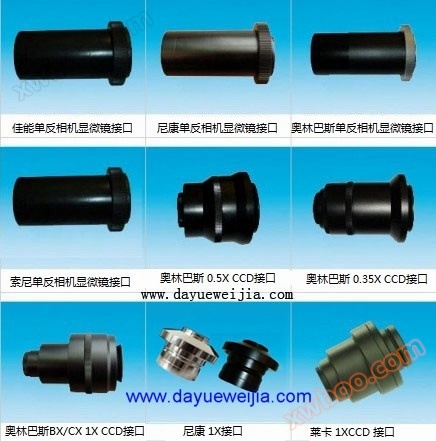


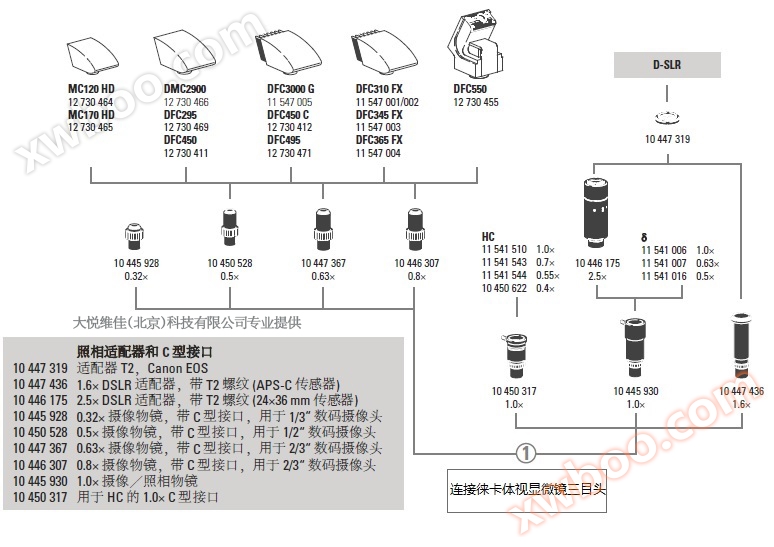
Overview of Leica Stereoscopic Microscope CCD Interface:
Leica stereomicroscope CCD interface item code:
The interface with code 10450317 1X for HC can connect to 11541510 1.0X HC interface, 11541543 0.7X HC interface, 11541544 0.55X HC interface, and 10450622 0.4X HC interface;
There are also CCD interfaces with codes of 10445928 0.32X, 10450528 0.5X, 10447367 0.63X, and 10446307 0.8X.
Leica Stereoscopic Microscope CCD Interface
Online inquiry
-
Contacts
-
Company
-
Telephone
-
Email
-
WeChat
-
Verification Code
-
Message Content
-