
VIP member
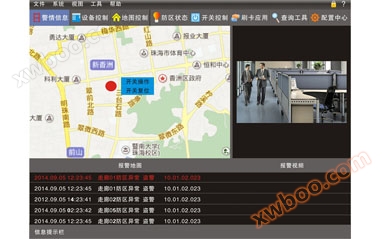
ES6020 Monitoring Platform Software
It is a comprehensive large-scale platform software that integrates functions such as alarm reception, video review, and information release. ※ Suppor
Product details
The interface supports various language changes
※ Simple operating interface, newly designed functional icons
※ User defined personalized startup and standby screens
※ Main interface alarm display, with multiple options such as text, map, video, etc
※ Alarm video review function, supporting video access for DVR, NVR, and network cameras
--When the alarm is triggered, 1-4 video frames will pop up directly
--Video capture
--Control the pan tilt of the camera: set preset points, cruise paths, focus adjustments, etc
--Multiple alarm video screens are displayed simultaneously, and one can be selected for enlarged display
--You can manually view the real-time image of a certain camera
--Video playback is compatible with H.265 and H.264 video encoding standards
※ Supports two modes of alarm map positioning: local map and online Baidu map
When displaying alarm points on the alarm map, you can directly use the mouse to operate the switch and deploy/disarm
When the defense zone alarms, up to 8 outputs can be linked together
※ It is possible to deploy and disarm a device group at once, or to individually deploy and disarm a specific device
※ Switch group configuration, equipment group can be configured arbitrarily
※ Each page can display up to 128 switches, and the switch names can be changed arbitrarily. Different switch groups can be selected for control
The device configuration includes intelligent replication function
Supports 5000 network devices
※ The equipment reports to the platform via LAN and Internet
The alarm voice of a single defense zone can be defined by oneself
※ System data can be backed up
※ Publish information to the client of the device's collaborative defense
Each device group can be configured with up to 32 clients
Online inquiry
-
Contacts
-
Company
-
Telephone
-
Email
-
WeChat
-
Verification Code
-
Message Content
-